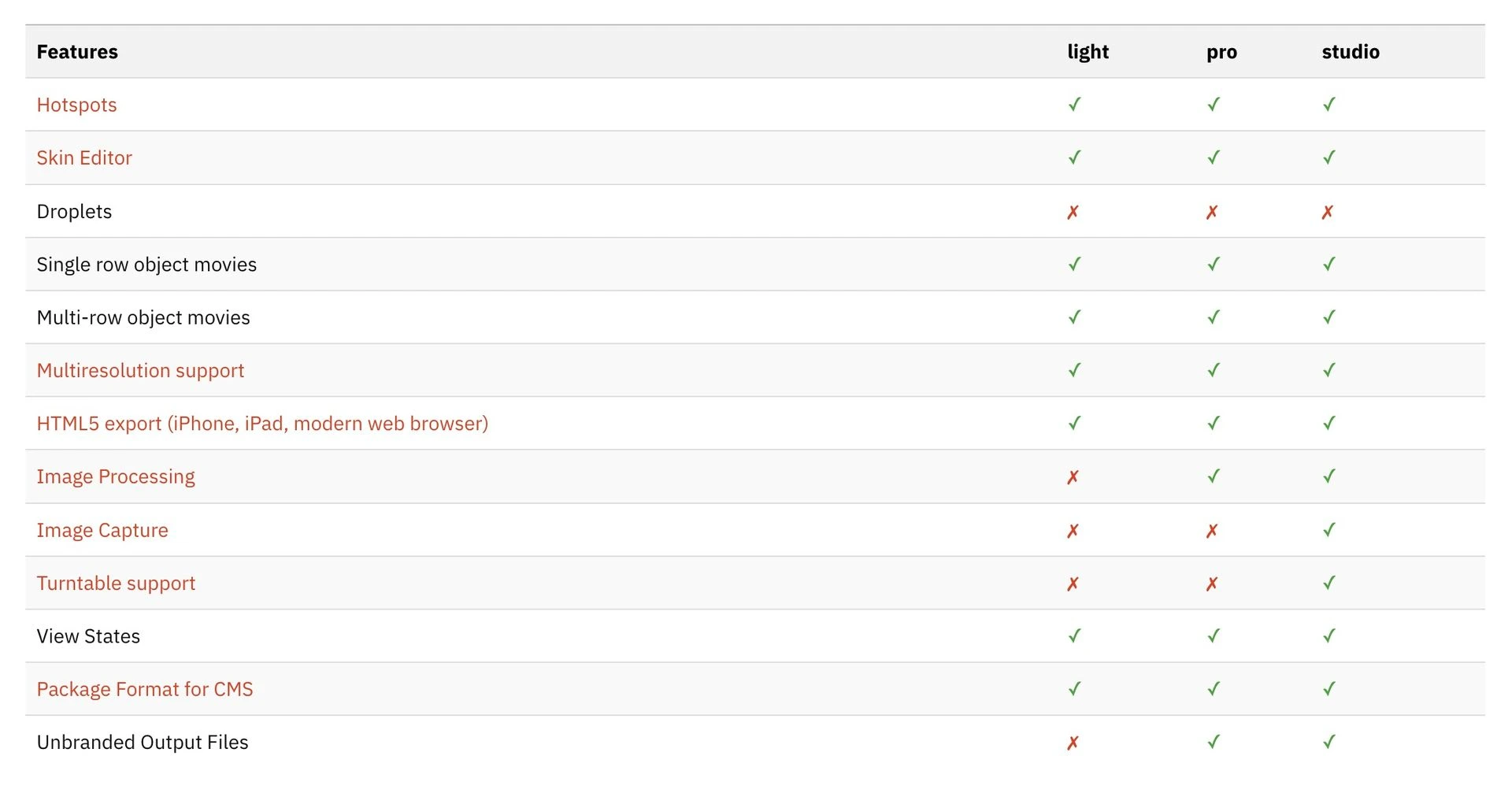
Object2VR Pro bietet alle Funktionen von Object2VR Light und zusätzlich noch Image Processing und Unbranded output files. Object2VR Studio bietet alle Funktionen von Object2VR Pro und zusätzlich noch Image Capture und Turntable support.
Produktvergleich:
Object2VR Features
Object2VR is your all-in-one program for 360 product photography. This software takes a series of images of an object from different angles and creates interactive 360º product photos that allow users to rotate and examine objects in virtual 3D.
Use the software to control your object turntable and take a series of precise images from multiple angles. Then, perfect your images with the built-in editing tools. Finally, output the project for playback on websites, devices, and kiosks.
Input
Create single-row, multi-row, and multi-state object movies. Object2VR supports JPEG, PNG, TIFF, PSD, and QuickTime VR source files.
Views
Use view states in Object2VR to display an object in different variants, for example, in different colors. Users can then switch between variants by selecting the different options available.
Interactive
Use interactive hotspots to display information, highlight an area of the object, or to open another 360 spin. The Hotspot Editor makes it easy to apply hotspots to individual images or to the whole project.
Skin Editor
Use the powerful Skin Editor to design a custom look and feel for the player. You can add animations, sound effects, custom buttons, fonts, and more.
Multiresolution
Let users zoom in deeper to see the detail in the object. Multi-resolution gives you multiple levels of resolution with smooth zooming and control.
Camera and Turntable Control (Studio only)
Connect your turntable and camera to your computer and let Object2VR do the hard work. Object2VR will trigger the camera as the turntable rotates. Sony, Nikon, and Canon DSLRs, along with many of the most popular turntables, are supported.
Image Processing (Pro and Studio only)
Basic image processing is supported in both Object2VR pro and Object2VR studio. Retouch the images right in Object2VR. Crop, mask, adjust levels, and fix drifting objects without having to leave the program.