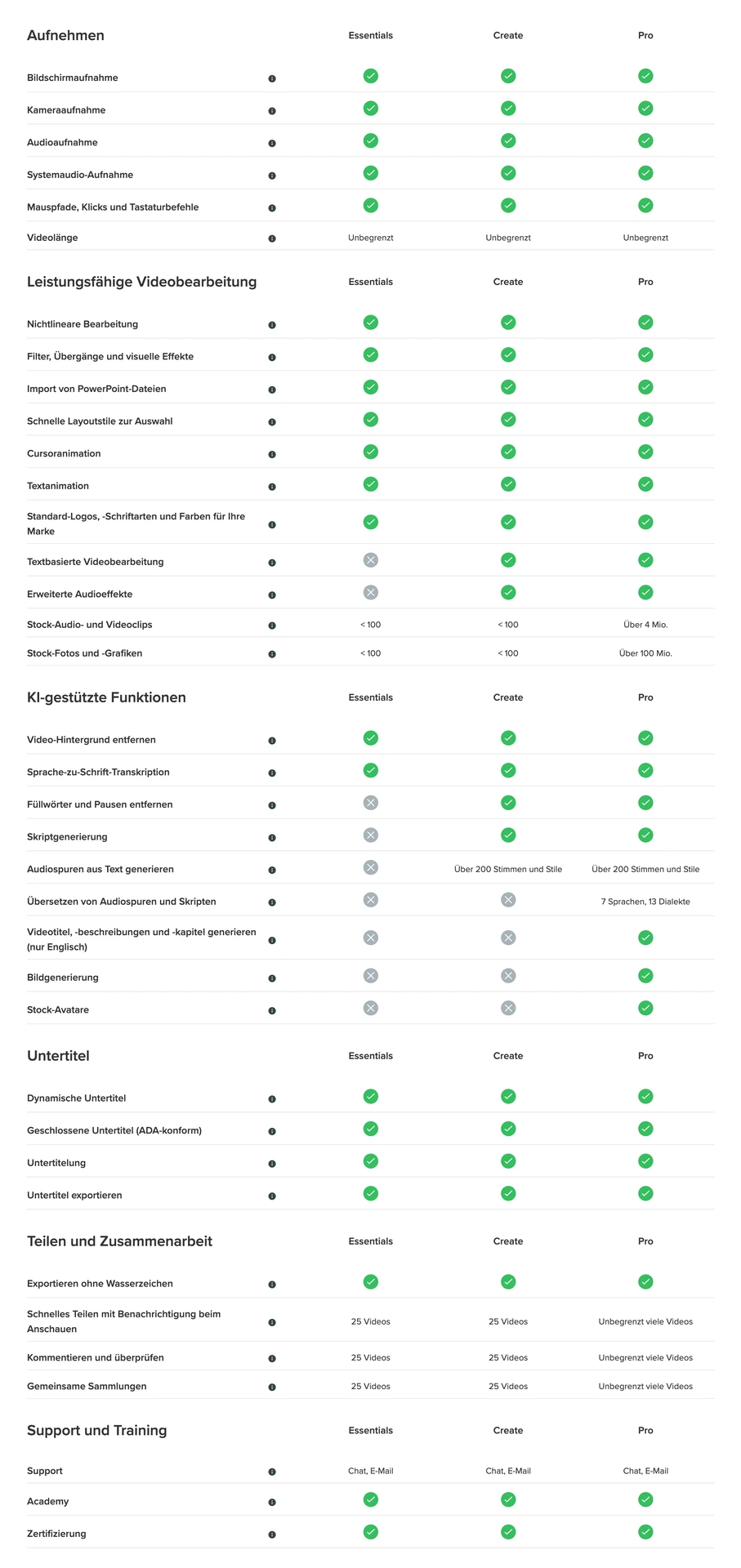
Screenflow kann den Computer-Bildschirm aufnehmen und gleichzeitig eine Video Kamera, ein Mikrofon und Computer Audio. Sie können das Video anschließend bearbeiten und als MP4, MOV oder M4V Datei ausgeben und auf Ihrer Webseite, Blog, Youtube, Vimeo, Google Drive, Dropbox, Wistia oder Facebook veröffentlichen.
ScreenFlow® is award-winning, powerful screencasting and video editing software for Mac that lets you create high-quality software or iPhone demos, professional video tutorials, in-depth video training, and dynamic presentations.
With ScreenFlow, you can record your computer screen, while also capturing a video camera, iOS device, multi-channel audio, a microphone and computer audio. The easy-to-use editing interface lets you creatively edit your video. The finished result is a polished, high-quality MP4, MOV or M4V movie, ready for publishing to your Web site, blog or directly to YouTube, Vimeo, Google Drive, Dropbox, Wistia or Facebook.
Record everything.
With ScreenFlow you can record the contents of your entire monitor while also capturing your video camera, iOS device, microphone and your computer audio.
Edit your video.
The easy-to-use editing interface lets you creatively edit your video, and add additional images, text, music and transitions for a professional-looking screencast.
Share with the world.
The result is an MP4, MOV or M4V movie, ready for publishing your screencasts to the Web or directly to YouTube, Vimeo, Wistia, Facebook, Google Drive or Dropbox.
Who uses ScreenFlow
- Educators: Record lectures, tutorials or rich media presentations. Use ScreenFlow to flip yourclassrooms - record high-quality video presentations for students to view for homework and use class time for more personalised working
- Camera and App Developers - Create videos to promote yourself of your application. Record your game session, iOS screen, or computer screen. Highlight areas of interest add text then share with the world.
- Bloggers -The easy to use timeline based video editing interface is perfect for editing product reviews, recording Skype interviews or creating product demonstrations.