FontAgent 10 for Mac Highlights
Creative productivity starts with a font collection that’s well organized and simple to explore. FontAgent brings order to chaos with native M-series performance, tagging, comprehensive metadata, powerful previewers, and a new, powerful Sets Manager to organize it all. Version 10 highlights include:
- All-New Sets Manager
- Native M-Series Chip Optimization
- One-Click Metadata Powerhouse
- Set Membership Tracker
- High-Integrity Font Catalog
- Duplicate Detector
- Lightning-Fast Search
- Auto-Activation in More Apps
- Sharable, Searchable Tags
- Freeform Comments
- Subscription Fonts Integration
- Print and Export Your Fonts
FontAgent 10 Windows Highlights
The need for advanced Windows font management continues its steady growth as organizations and individuals turn to cost-effective PCs to handle their creative and business workflow challenges. Version 10 of FontAgent for Windows adds a bevy of new features that enhance the font management, control and compliance power of the World’s Smartest Font Manager.
All-News Sets Manager
- Hierarchical filtering for more organization
- Set membership tracker that shows to which sets fonts belong
OS and Application Support
- Optimized for Windows 10 and 11
- Support for InDesign, Photoshop and Illustrator in Creative Cloud
- Native Windows UI to promote productivity and speed learning
Improved Font and Metadata Search
- Stronger smart search for finding fonts fast
- Enhanced duplication detection
Web and Subscription Font Support
- Make subscription fonts work seamlessly with the rest of your fonts
- Activate and deactivate fonts in Adobe Fonts subscription service
The Power to Organize
As you add fonts to your catalog, FontAgent logs, tests and fingerprints them, and eliminates duplicates. Organize and classify your fonts however you want using sets, subsets, smart sets, tags and comments. Search through all your sets in a snap.
The Power to Discover
FontAgent lets you preview, search, compare your fonts and their metadata in a modern Windows UI that you can customize on the fly. Compare face, weight, slant, width and color alternatives in seconds. Stay light or be bold. Find the right font for each project in no time.
The Power to Create
Using FontAgent, you create better designs and documents in Microsoft, Adobe, Affinity and all your favorite applications. Select, activate and stylize type to your heart's content. Streamline your workflow and improve everything you produce.
The Power to Share
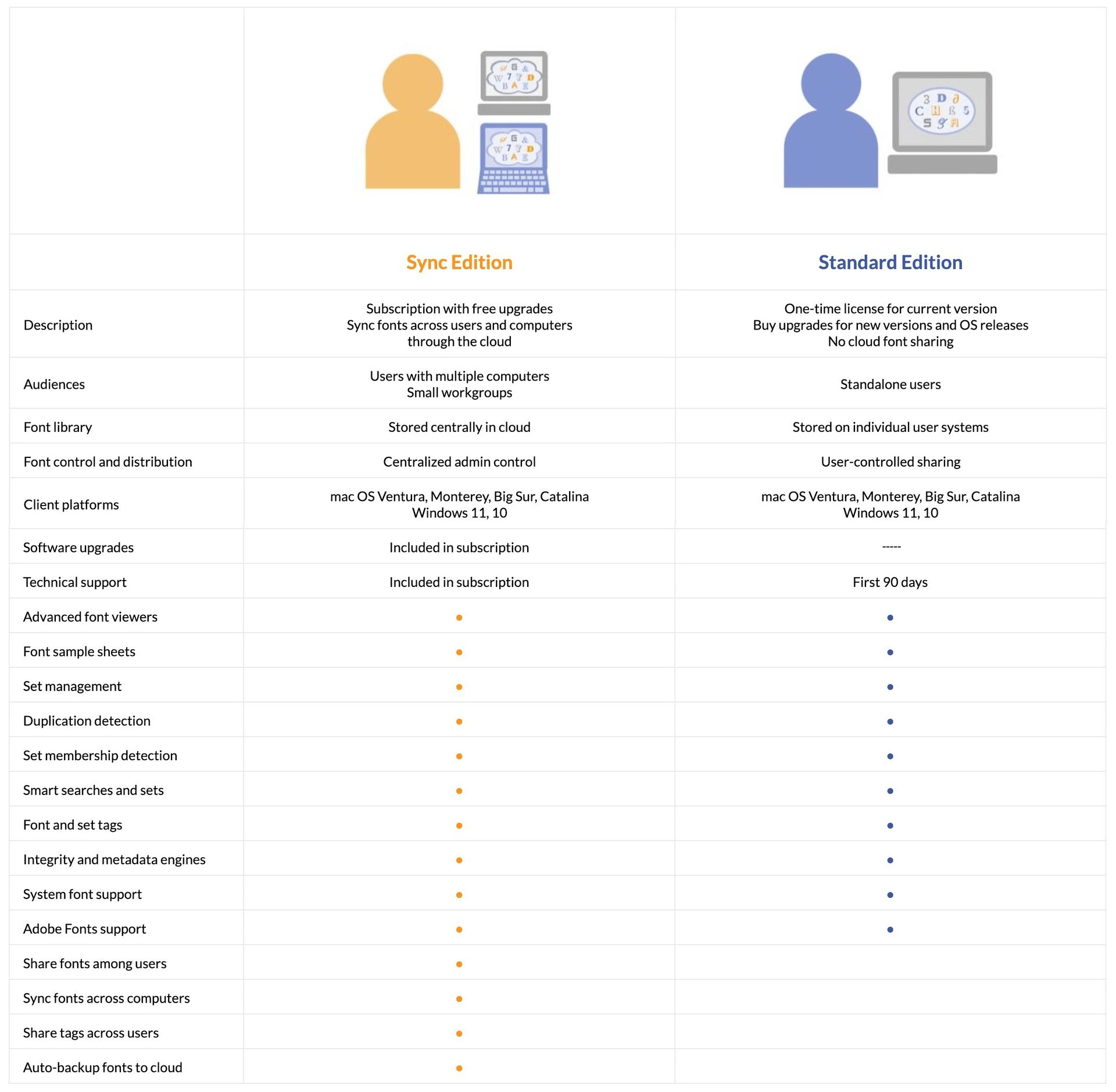
FontAgent makes it simple to share your fonts. Create specimen sheets for your clients. Export fonts and send them to outside agencies. Share your fonts, sets and tags with others through FontAgent Sync or Server to maintain consistency and control.