MacDrive has built a reputation on blazing quick read/write speeds, unparalleled data security and ease of use. Access your Mac disks from the Disk Management Window or direct from Explorer. Whether it is a new state of the external SSD drive or a high density floppy, MacDrive makes it possible to read and write to Mac disks seamlessly from your PC.
With MacDrive installed on your Windows PC, you can easily share files to and from APFS and HFS+ formatted internal drives, portable and desktop multi-bay drives, and even iPads. Regardless of the platform, you can read and write to the drive and then share those files. MacDrive gives you fully compatible and reliable out-of-this-world data sharing convenience.
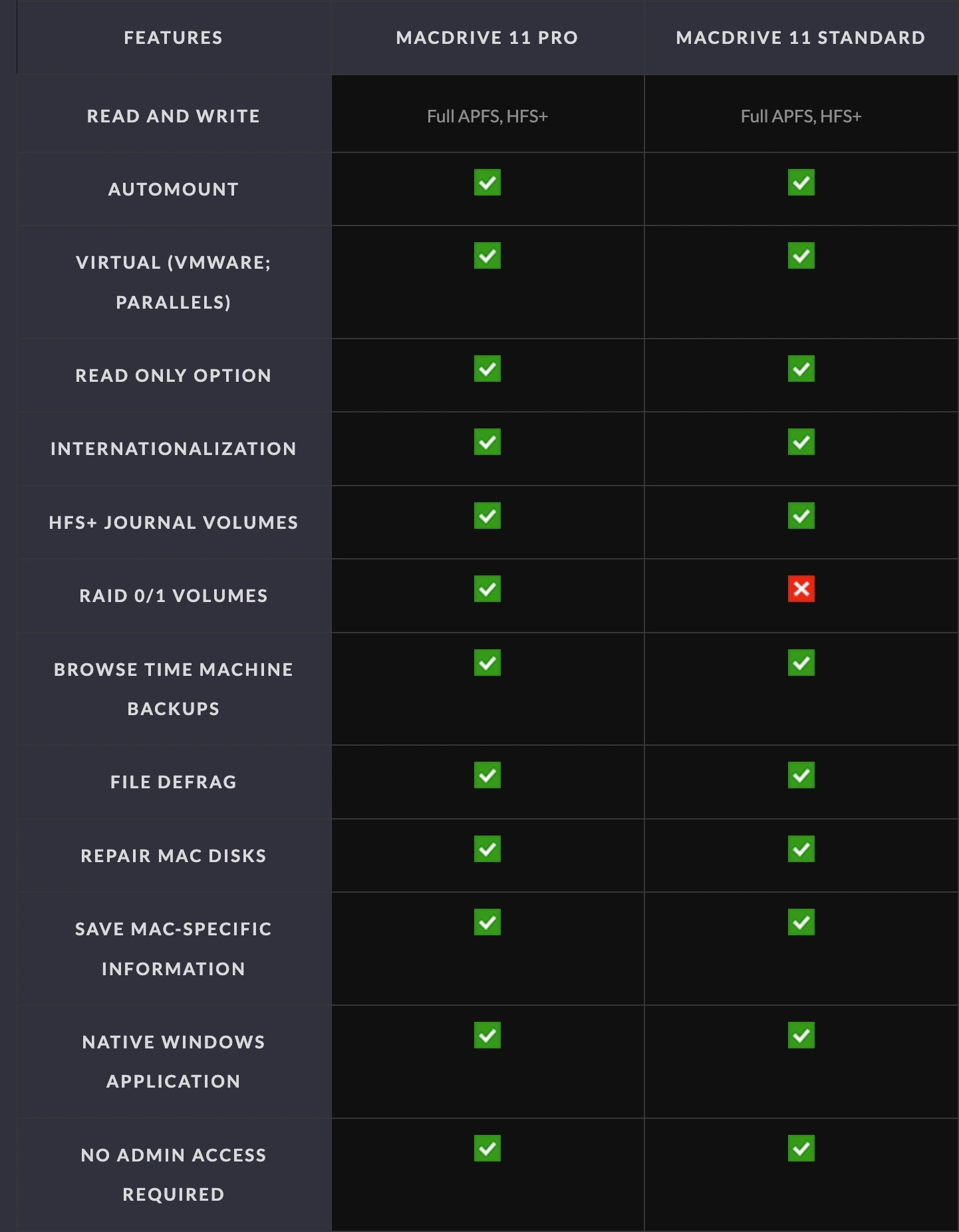
By installing OWC MacDrive on a Windows PC, you make it become "Mac aware" and can access Mac-formatted drives easily. There is nothing to launch or learn. MacDrive 11 Standard allows users to simply connect a Mac-formatted drive to your PC and it will behave like any other disk on the system. You will be able to read and write to almost any hard drive, SSD, CD, DVD, and more. You can even access SoftRAID and Apple RAID 0 and RAID 1 volumes with MacDrive 11 Pro.